The Art of Photography

By Nader El Assy

  • Home
  • Portfolio
  • Education
  • Behind The Scenes
  • About Me

Instagram

Instagram did not return a 200.

Instagram

Facebook

Facebook

Most Used Tags

a7 Alexandria alpha architect architecture beach Cairo ceiling Citadel clouds Dome Egypt el assy garden HDR history How to interior islam light Lightroom Long Exposure Malaysia Masjid Mid-east middle east monochrome monument mosque movenpick Muslim nader night Old photography Photoshop reflection Sea sky Sony street Sunset tourism tree warm

Follow Me

Follow Me

Experimenting “Adaptive Wide Angle” Filter in Adobe Photoshop

  • Education
Share it on Share on Facebook
Facebook
0Share on Google+
Google+
0Tweet about this on Twitter
Twitter
Pin on Pinterest
Pinterest
0

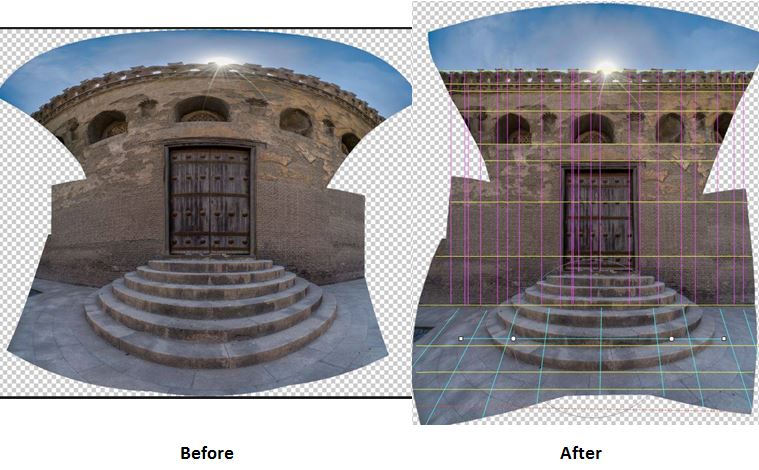
Panorama, before and after Adaptive Wide Angle filter
Photo [1] Panorama, before and after Adaptive Wide Angle filter

Photographers who are used to the ultra-wide angle lenses, multiple shots Panorama or Architectural photography probably know and love this filter. In short, this filter allows you to straighten curved lines, when they were originally straight. The filter also gives you the option to identify vertical and horizontal lines in the photo. The smart part of that process is how the filter handles adjusting the remaining areas of the photos to lean with your choices.

المصورين الذين تعودوا على استخدام العدسات ذات الزاوية الواسعة، أو يقومون بعمل صور البانوراما متعددة الصور أو مصورين الصور المعمارية ربما يعرفون، بل ويعشقون هذا الفلتر. باختصار، يسمح هذا الفلتر بتصحيح الخطوط المنحنية والمنبعجة فى الصورة، إذا كانت تلك الخطوط مستقيمة فى الواقع. يعطي لك الفلتر أيضا الخيار لتحديد الخطوط الرأسية والأفقية في الصورة. الجزء الذكي فى هذه العملية هى كيف يقوم هذا الفلتر بضبط المناطق المتبقية من الصورة والتكيف مع خياراتك.


In the above example, it was a merge of 6 frames captured as panorama. And it was a real challenge to align all these straight lines of the bricks. As I said, the filter was very smart to identify how that semicircular stairway should look after I applied my lines straightness choices.

في المثال بالأعلى Photo 1، تم دمج 6 صور بأسلوب  البانوراما. وكان تحديا حقيقيا ان يتم الجمع بين جميع هذه الخطوط المستقيمة من الطوب. وكما قلت، كان الفلتر الذكي جداً فى تحديد كيف ينبغي أن يظهر ذلك السلم النصف دائري بعد طبقت خياراتي لاستعادة استقامة الخطوط.


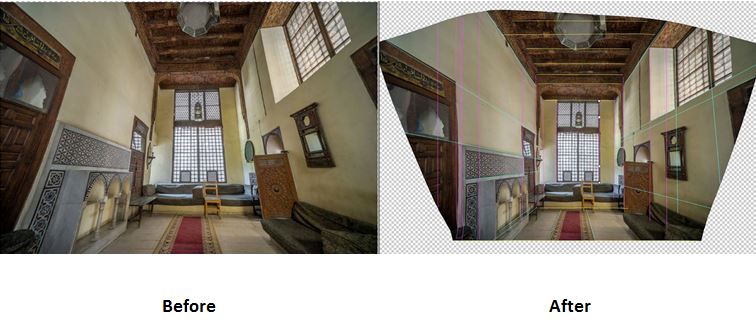
Here is another example where it was a single photo. This was captured with the 10 – 18 mm ultra-wide angle lens. This photo was a bit easier than the above one as the main lines were not that many. But still, the filter is very fast and accurate in capturing what you are thinking about.

هنا مثال آخر Photo 2 حيث كانت صورة واحدة. تم تصويرها باستخدام عدسة ذات زاوية واسعة جداً 10-18 ملم. هذه الصورة كانت أسهل قليلاً من الصورة الأولى حيث لم تكن الخطوط الرئيسية لم تكن كثيرة. ولكن لا يزال أداء الفلتر سريع ودقيق جداً فى تطبيق المعالجة التى تريدها.

wide
Photo [2] Wide Angle, before and after Adaptive Wide Angle filter

You can find this filter in Photoshop under the Filter Menu. And it’s a basic filter that comes normally with the software, no external downloads are needed.

يمكنك العثور على هذا الفلتر في Photoshop تحت القائمة “Filter”. وهو من الفلاتر الأساسية التي تأتي عادة مع البرامج، وليس هناك حاجة إلى استخدام برامج خارجية.


Photo [3] Adaptive wide angle filter

I’m sure you will enjoy this filter too. try it and leave me a comment with your impression.

أنا على ثقة من أنكم ستستمتعون باستخدام هذا الفلتر فى صوركم أيضا. قم بتجربته واترك لى رأيك وتعليقك.


a7 Adaptive adaptive wide angle Adobe Angle Architectural curve Filter HDR horizontal How to lens line Panorama photography Photoshop Sony straight ultra vertical Wide
November 1, 2014 Nader

Post navigation

Petronas Gate at Night → ← HDR Photography “How to?” step by step (in Arabic)

2 thoughts on “Experimenting “Adaptive Wide Angle” Filter in Adobe Photoshop”

  1. Pingback: KLCC Mall, Vertorama and Shadows Recovery | The Art of Photography
  2. Pingback: The Old Gate | The Art of Photography

Leave a Reply

Your email address will not be published. Required fields are marked *

Related Posts

Masjid Putrajaya and Sleeklens Collections

<div class="at-above-post addthis_tool" data-url="http://www.naderelassy.com/2017/10/22/masjid-putrajaya-sleeklens-collections/"></div>Share it on Facebook0Google+0TwitterPinterest0 Here is a photo I took for the well-known Mosque in Putrajaya, Malaysia. I took the shot few years back and I didn’t get a chance […]<!-- AddThis Advanced Settings above via filter on wp_trim_excerpt --><!-- AddThis Advanced Settings below via filter on wp_trim_excerpt --><!-- AddThis Advanced Settings generic via filter on wp_trim_excerpt --><!-- AddThis Share Buttons above via filter on wp_trim_excerpt --><!-- AddThis Share Buttons below via filter on wp_trim_excerpt --><div class="at-below-post addthis_tool" data-url="http://www.naderelassy.com/2017/10/22/masjid-putrajaya-sleeklens-collections/"></div><!-- AddThis Share Buttons generic via filter on wp_trim_excerpt -->

Episode 1: Knowing the Landmarks

<div class="at-above-post addthis_tool" data-url="http://www.naderelassy.com/2016/08/18/episode-1-knowing-landmarks/"></div>Share it on Facebook0Google+0TwitterPinterest0<!-- AddThis Advanced Settings above via filter on wp_trim_excerpt --><!-- AddThis Advanced Settings below via filter on wp_trim_excerpt --><!-- AddThis Advanced Settings generic via filter on wp_trim_excerpt --><!-- AddThis Share Buttons above via filter on wp_trim_excerpt --><!-- AddThis Share Buttons below via filter on wp_trim_excerpt --><div class="at-below-post addthis_tool" data-url="http://www.naderelassy.com/2016/08/18/episode-1-knowing-landmarks/"></div><!-- AddThis Share Buttons generic via filter on wp_trim_excerpt -->

Thoughts ِ- Planning Travel Photography

<div class="at-above-post addthis_tool" data-url="http://www.naderelassy.com/2016/07/08/planning-travel-photography/"></div>Share it on Facebook0Google+0TwitterPinterest0<!-- AddThis Advanced Settings above via filter on wp_trim_excerpt --><!-- AddThis Advanced Settings below via filter on wp_trim_excerpt --><!-- AddThis Advanced Settings generic via filter on wp_trim_excerpt --><!-- AddThis Share Buttons above via filter on wp_trim_excerpt --><!-- AddThis Share Buttons below via filter on wp_trim_excerpt --><div class="at-below-post addthis_tool" data-url="http://www.naderelassy.com/2016/07/08/planning-travel-photography/"></div><!-- AddThis Share Buttons generic via filter on wp_trim_excerpt -->

The Worker

<div class="at-above-post addthis_tool" data-url="http://www.naderelassy.com/2016/03/13/the-worker/"></div>Share it on Facebook0Google+0TwitterPinterest0<!-- AddThis Advanced Settings above via filter on wp_trim_excerpt --><!-- AddThis Advanced Settings below via filter on wp_trim_excerpt --><!-- AddThis Advanced Settings generic via filter on wp_trim_excerpt --><!-- AddThis Share Buttons above via filter on wp_trim_excerpt --><!-- AddThis Share Buttons below via filter on wp_trim_excerpt --><div class="at-below-post addthis_tool" data-url="http://www.naderelassy.com/2016/03/13/the-worker/"></div><!-- AddThis Share Buttons generic via filter on wp_trim_excerpt -->

Recent Posts

Motion on The Westminster Bridge

Share it on Facebook0Google+0TwitterPinterest0In this photo I [...]

More Info

Masjid Putrajaya and Sleeklens Collections

Share it on Facebook0Google+0TwitterPinterest0 Here is a [...]

More Info
Episode 1: Knowing the Landmarks

Episode 1: Knowing the Landmarks

Share it on Facebook0Google+0TwitterPinterest0

Thoughts ِ- Planning Travel Photography

Share it on Facebook0Google+0TwitterPinterest0
Powered by WordPress | theme Dream Way